
Sheru Bhai AI Photo: How to Make the Viral Lion-Boss Selfie
A sheru bhai ai photo puts you beside the viral AI lion boss, or turns you into him, in one still image. Generate one lion character, keep it as your reference, then add your selfie and a scene prompt. Renoise uses GPT Image 2 at 2K for 16 credits; SketchTo lists Nano Banana at 2 credits. There is no official prompt, so consistency comes from reusing the same lion.
View 4 referencesAllow the functional cookie to save your likes. Privacy details
What Is a Sheru Bhai AI Photo?
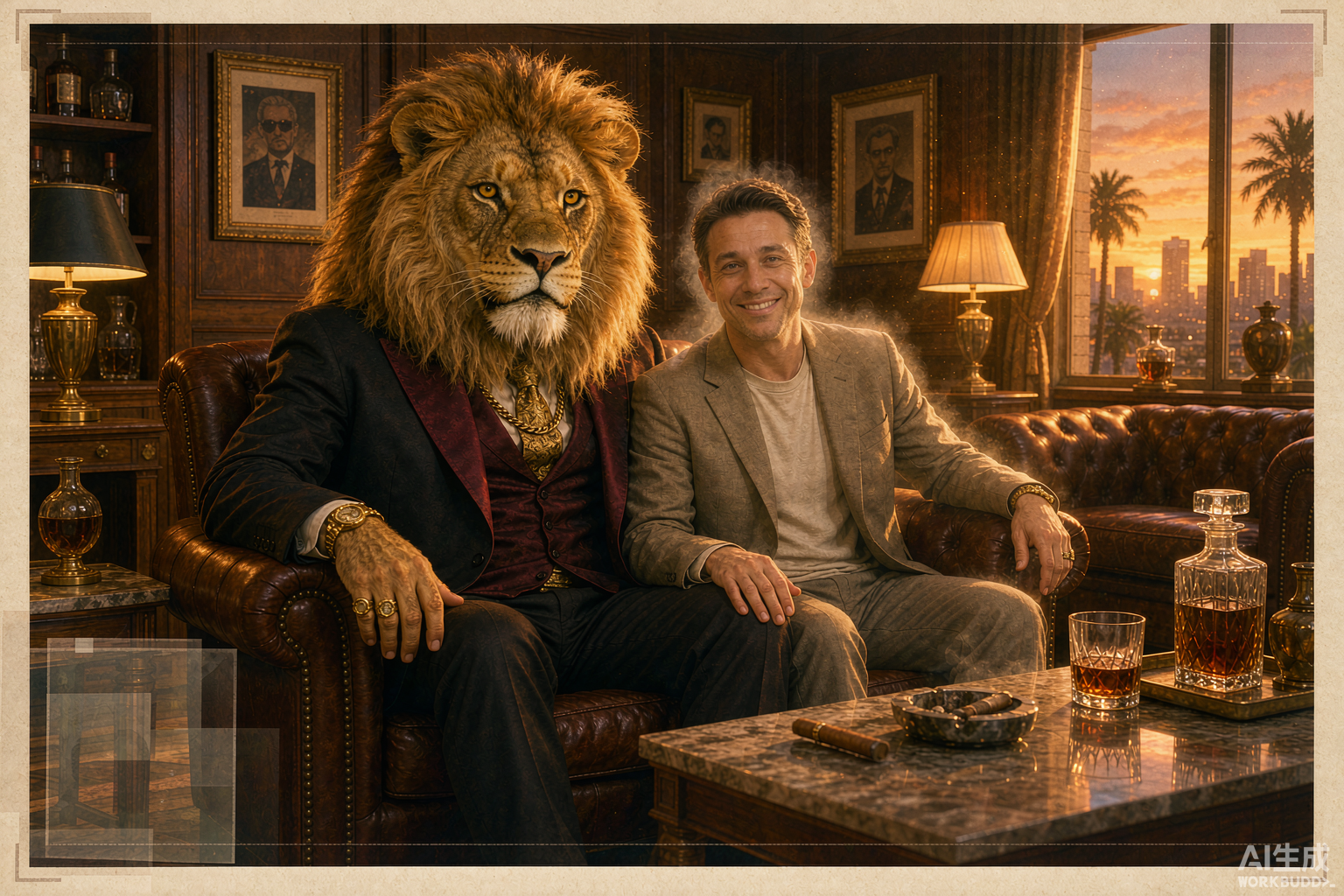
A sheru bhai ai photo is the still-image branch of a viral AI meme. Sheru Bhai is a fictional, AI-generated character: a man with a realistic lion's head who dresses like a boss and lives an absurdly rich life. No studio or brand owns him, and nobody has been verified as the creator. The name is Hindi-Urdu slang — sher means lion, bhai means brother — so it reads roughly like "Lion Bro" or "the boss".
Search interest exploded in India in autumn 2026: Google Ads counted about 22,200 searches for the character in October, up from roughly 1,300 in September, and by mid-November the still format was what most people wanted to make. A sheru bhai ai photo usually shows you standing next to the lion like an old friend, his paw on your shoulder, in front of a palace, luxury car or auction hall. That is why a sheru bhai ai photo is now easier to find in search results than the original clips.
Three Ways to Appear in a Sheru Bhai AI Photo
Before generating anything, decide which sheru bhai ai photo you actually want. Sources covering the trend describe three recurring formats:
| Format | What it looks like | What you need |
|---|---|---|
| Photo with Sheru | You standing beside the lion boss, paw on your shoulder | One selfie + one lion reference |
| You as Sheru | Your features mapped onto a lion-headed boss in the white suit | One photo + a style reference |
| Story stills | A single frame from an auction or boss-entrance skit | Text only |
Most new searches target the first two. The video branch — short Hindi or Hinglish clips built around an auction punchline — is where the trend started, but a single sheru bhai ai photo is a complete deliverable that takes one generation.
How to Make a Sheru Bhai AI Photo, Step by Step
The workflow that keeps a sheru bhai ai photo consistent is always the same: build the lion once, then reuse it.
Step 1: Generate one lion boss reference
Write a text-only portrait prompt and save the result. Every later sheru bhai ai photo uses this image as the lion reference, so the mane, suit and sunglasses stay identical across the set.
Step 2: Lock the character block
Paste the same character description into every image and do not rewrite it. This block is what makes a sheru bhai ai photo recognizable: mane, eyes, suit, gold chain and sunglasses. Spell the outfit out piece by piece so the model does not drift into a generic "lion king".
Step 3: Add a scene paragraph and your selfie
Upload a clear, front-lit photo of yourself as a reference image, then append a scene paragraph describing the pose, location and light. For a sheru bhai ai photo that still reads as you, keep one instruction: keep facial structure, skin tone, hairstyle and expression identical to the reference image.
Step 4: Generate, compare, iterate
Change one variable per attempt — pose, light or likeness. Make a first sheru bhai ai photo in one run, then fix only what broke; changing three things at once hides what helped.
The fixed character block
A photorealistic anthropomorphic lion character: a tall white lion with a thick
snow-white mane, pale gold eyes and a calm, confident expression, wearing a
tailored white three-piece suit with a crisp white shirt, a gold Cuban-link
chain, a gold wristwatch, gold rings and black aviator sunglasses. Natural fur
texture, realistic anatomy with five-fingered hands, editorial fashion
photography lighting, 50mm lens, shallow depth of field, no logos, no text.
For the golden-lion variant, swap only the opening line and the suit: "a muscular golden lion with an amber mane and amber eyes" and "an ivory double-breasted suit with a charcoal waistcoat". Leave everything else alone.
Copy-Ready Sheru Bhai AI Photo Prompts
A prompt has two parts: the fixed character block above and a scene paragraph. Keep the first verbatim, swap the second. There is no official prompt, so treat every sheru bhai ai photo instruction as a starting point you edit.
Courtyard, paw on your shoulder
The lion stands on the right side of the frame with its right paw resting
lightly on the shoulder of the person in the reference image, who stands on
the left in [a light blue linen shirt and white trousers]. Keep the person's
facial structure, skin tone, hairstyle and expression identical to the
reference image. Sunlit stone courtyard with columns and green foliage,
golden-hour light from the left, both subjects sharply in focus, 50mm lens,
eye-level camera, three-quarter body framing, photorealistic.
Why this sheru bhai ai photo works: the contact point is stated precisely, which is the hardest part of a two-subject image to render cleanly.
Luxury car at night
The lion stands beside an unbranded black luxury sedan in an underground
parking garage, one paw in his pocket, chin slightly raised. The person from
the reference image stands beside him, half a step forward, looking at the
camera. Keep the person's facial structure, skin tone and hairstyle identical
to the reference image. Cool overhead garage lights with warm rim light on
the fur, wet concrete floor with soft reflections, 35mm lens, low camera
angle, full-body framing, cinematic contrast, photorealistic.
Why this sheru bhai ai photo works: the "flex" comes from light and angle, not a car brand, so no real logo has to appear.
Palace auction hall
The lion sits in the front row of an opulent auction hall, holding a numbered
paddle, the person from the reference image seated beside him. Keep the
person's face, skin tone and hairstyle identical to the reference image. Warm
chandelier light, blurred bidders in the background, dark wood and gold
details, 85mm lens, shallow depth of field, editorial cinematic lighting,
photorealistic.
Why this sheru bhai ai photo works: it matches the auction scenes that made the character famous, while keeping your face as the only variable.
Tools and Costs for a Sheru Bhai AI Photo
| Tool / model | Photo workflow | Reported cost |
|---|---|---|
| Renoise (GPT Image 2) | Generate lion, then two-reference photo at 2K, 9:16 | 16 credits per image |
| SketchTo (Nano Banana) | Custom prompt + up to three reference images | 2 credits per image |
| SketchTo (FLUX 2 Flex / Nano Banana Pro) | Same reference workflow, higher-cost models | 6 / 8 credits |
| Kapwing | Upload a selfie to a reference-capable image generator | Varies by model |
On Renoise, every sheru bhai ai photo is a GPT Image 2 output at 2K and 9:16, and costs 16 credits; the lion reference itself costs the same. SketchTo lists Nano Banana at 2 credits per image, so a new account's four credits cover two attempts, with higher-cost models available. Before you pay for a sheru bhai ai photo, check that the model accepts two reference images at once — that is what makes "you beside the lion" possible. Kapwing's tutorial notes that one Sheru Bhai video passed four million views, but its photo route is a single reference-based generation — you do not need the video tools to join in.
Common Sheru Bhai AI Photo Mistakes
Your face drifts
The usual cause of a failed sheru bhai ai photo is a conflict: you describe your own face in the prompt and upload a reference, so the model averages the two. Upload one clear photo, delete any sentence describing your face, and keep a single likeness instruction. If it still changes, simplify the scene.
The paw and hand melt together
Physical contact between two subjects is the hardest request in a sheru bhai ai photo. Either state the arrangement exactly — "the lion's right paw rests on the person's left shoulder, arm crossing behind the neck" — or remove contact and let both stand shoulder to shoulder. A clean, less intimate pose beats a fused hand.
The lion turns cartoonish
This happens when the scene paragraph re-describes the lion in new words. Delete those adjectives, leave the character block untouched, and add "photorealistic, not a cartoon, not an illustration". If a model keeps drifting, switch models instead of rewriting the character.
Text, logos and unnamed details
Small text becomes gibberish, and real brands sneak in through names like "Rolls-Royce". Ask for a luxury car "with no badge or logo" and keep text-bearing props out of frame. Details you do not name get changed — if white shoes matter, write them into the sheru bhai ai photo prompt.
Tips to Make Your Sheru Bhai AI Photo Look Real
- Frame it vertical. A 4:5 or 9:16 crop suits where these images are posted and forces a tighter composition.
- Name a lens. "50mm" and "eye-level" give a normal human perspective; "wide-angle" gives the stretched, obviously generated look.
- Keep one imperfection. A little grain and slightly off-centre framing make a sheru bhai ai photo sit closer to a phone snapshot than a polished studio render — the cheapest way to make a sheru bhai ai photo look less like AI.
- Avoid symmetry. Two subjects staring straight ahead at the same height looks synthetic, so turn one head.
- Use a photo you have the right to edit. Your own face is fine; do not put a celebrity, someone else's photo or a child beside the lion without permission.
FAQ: Sheru Bhai AI Photo
Is there an official prompt? No. The character is fan-made, and the pages documenting it publish descriptive text rather than an official preset; exact identity preservation is not guaranteed.
Is Sheru Bhai a real person? No. He is an AI-generated character — a human body in a suit with a lion's head — with no verified creator.
Can I make a sheru bhai ai photo from a single picture? Yes. Generate the lion once, then attach your selfie and the lion image to a scene prompt. One still is a finished deliverable.
What does the name mean? "Sheru" is a nickname built on the Hindi-Urdu word for lion, and "bhai" means brother — roughly "Lion Bro".
The Short Version
A sheru bhai ai photo is easiest when you stop treating it as a one-off. Generate one lion boss, paste the same character block into every scene, upload one clean selfie, and lock the likeness with a single sentence. Then fix failures one at a time. The prompt is the easy part; changing one variable per attempt is what produces a sheru bhai ai photo that survives a second look.